![fourvenues.LOGO.blanco.png]](https://base-conocimientos.fourvenues.com/hs-fs/hubfs/fourvenues.LOGO.blanco.png?height=40&name=fourvenues.LOGO.blanco.png)
Before You Begin
Learn how to log out of Fourvenues PRO and manage access across multiple devices.
ℹ️ Who Can Do This?
All users of Fourvenues PRO.
Step By Step
1. Access Your User Profile
To log out or review your connected devices, go to your user settings in Fourvenues PRO. Click on the three dots in the top-right corner and select "My Profile".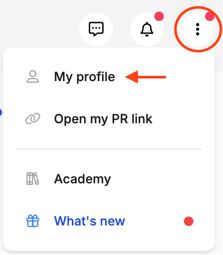
2. Review Active Sessions
In "My Profile", navigate to the "Sessions" tab. Here, you'll see all devices where your account is active and manage remote logouts.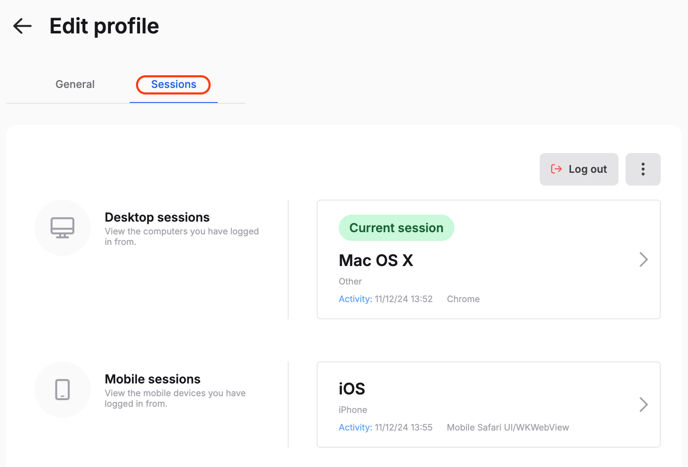
- Log Out of All Devices: Click on the three dots at the top of the page and select "Log Out of All Sessions" to end all active sessions.
🔑 Passwordless login reminder: When you log in again, remember that Fourvenues PRO doesn’t require a password. Each time you want to log in, you’ll receive a confirmation email. Simply click the link in the email to access your account quickly and securely.
Delete Your Account
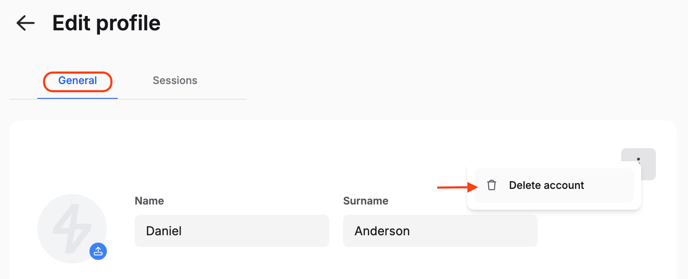
If you want to delete your account permanently, you can do so from the "General" tab. Click on the three dots in the top-right corner of that tab and select "Delete Account".
⚠️ Important: This action is irreversible.
👥 Need More Help?
If you have any questions or require further assistance, contact us at help@fourvenues.com for support with session management or any other inquiries.