![fourvenues.LOGO.blanco.png]](https://base-conocimientos.fourvenues.com/hs-fs/hubfs/fourvenues.LOGO.blanco.png?height=40&name=fourvenues.LOGO.blanco.png)
Before you begin
Learn step by step how to find your general sales link as well as the specific event link from Fourvenues PRO.
ℹ️ Who can do this?
All Fourvenues PRO users.
Step by step
You need to distinguish between two types of links:
1. PR general link.This link will show all the events you collaborate with.
How to access it:
- Log in to PRO, go to the three dots in the top-right corner, and select "My Profile".
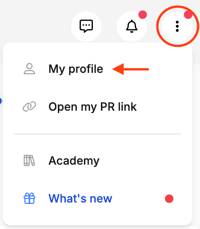
- In the "General" tab, you will find your PR link in the bottom field.
- Click the clipboard button to copy the link or the redirection button to open the page in your browser.
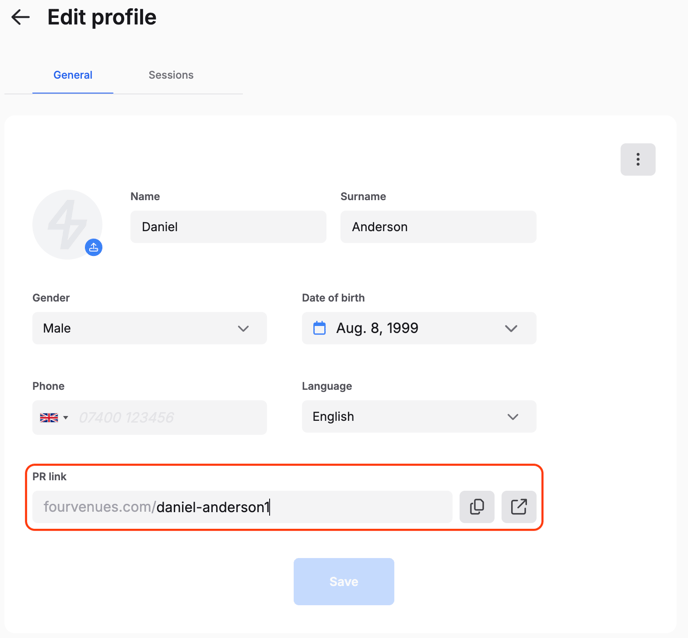
- Click the clipboard button to copy the link or the redirection button to open the page in your browser.
2. Event-Specific Link
Unlike the general link, this one directs users to the ongoing sale of the available services for a specific event.
How to access it:
- Log in to Fourvenues PRO > Events Calendar > Event.
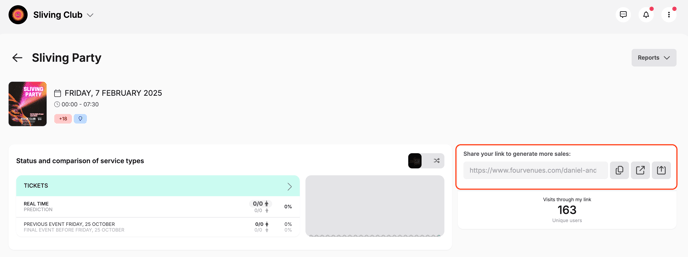
- Click the clipboard button to copy the link or the redirection button to open the page in your browser.
-
- You can also use the share button to distribute the link through your social media.
🧠 Reminder:
- All sales generated through these links will be attributed to your user account.
- You can review your sales reports to track these transactions.
👥 If you need more information, feel free to contact us at help@fourvenues.com, letting us know how we can assist you.