![fourvenues.LOGO.blanco.png]](https://base-conocimientos.fourvenues.com/hs-fs/hubfs/fourvenues.LOGO.blanco.png?height=40&name=fourvenues.LOGO.blanco.png)
Before you begin
ℹ️ Who can register new users
Profiles with the following permissions:
- Administrators
- Sales channel management
Step by step
1. Access the Users Section
- Log in to Fourvenues PRO.
- Go to Settings and select the Users tab.
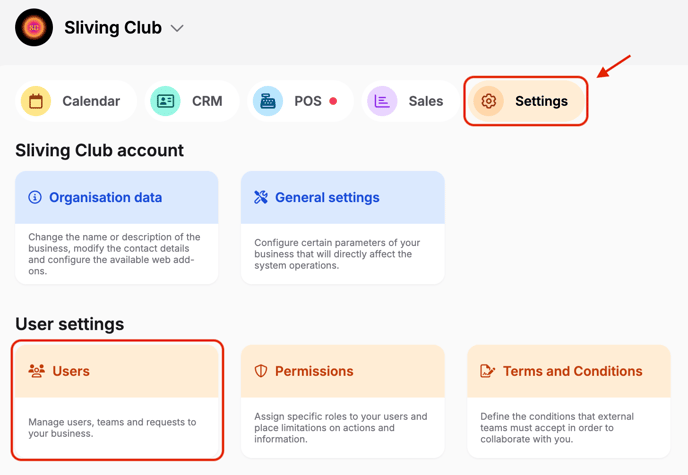
- Click New > Add User.

You can add public relations representatives (PRs) to your organization in two ways: by request or by invitation.
- By Request: share your business link with the person(s) you want to add to your organization so they can send a request to collaborate.
- ⚠️ Remember: These requests must be approved by users with administrator permissions or sales channel management permissions.
- By Invitation: send an invitation to each person you want to add to your organization. You can send multiple invitations at once by entering their email addresses and full names in the following format: [email][space][first and last name]
- ℹ️ Before sending the invitation, you can select the language in which the recipient will receive the notification via email.
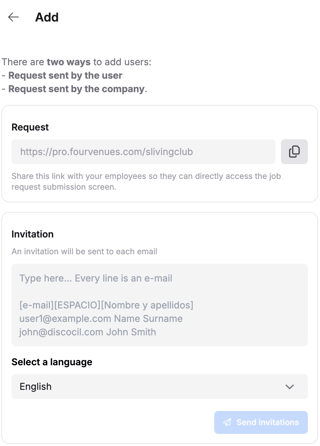
- ℹ️ Before sending the invitation, you can select the language in which the recipient will receive the notification via email.
🧠 Remember: All users accessing the platform or your organization for the first time, either by invitation or request, will have PR roles. This means they can only view their sales and can not make changes or access confidential data.
👥 If you need more information, please do not hesitate to contact us at help@fourvenues.com, letting us know how we can assist you.