![fourvenues.LOGO.blanco.png]](https://base-conocimientos.fourvenues.com/hs-fs/hubfs/fourvenues.LOGO.blanco.png?height=40&name=fourvenues.LOGO.blanco.png)
Before you begin
Tax details are used to:
-
Issue correct invoices.
-
Link income and withdrawals to a legal entity.
-
Comply with tax and accounting requirements.
-
Avoid issues with payments, settlements, or audits.
ℹ️ Who can do this: users with Administrator permissions in Fourvenues PRO.
⚠️ Entering tax details is a mandatory requirement to start selling through Fourvenues.
Step by step
When creating your organisation in Fourvenues, tax details can be added directly from:
Settings > Invoices > Tax details
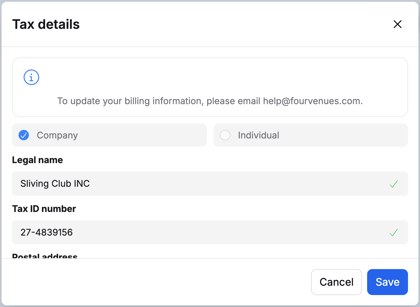
This information is linked to the organisation from the beginning and will be used by default for invoicing.
Important considerations
⚠️ Tax details cannot be freely edited once the organisation is active.
This is because any change implies a legal change of ownership, with a direct impact on invoicing, payments, and tax responsibilities.
Need help updating tax details?
📩 If you need to update your organisation’s tax details, please contact help@fourvenues.com. Our support team will guide you through the process and let you know which documentation is required.
The team will provide:
-
The Subrogation Agreement.
-
Instructions on how to complete it correctly.
-
A detailed list of the required documentation.
ℹ️ This process allows the change of ownership to be formalised in a legal and secure way for all parties.